
Discord is one of the few platforms where your username actually gets seen constantly — in chat, in voice channels, in server member lists. People notice it. And unlike Instagram or TikTok where your profile picture does a lot of the heavy lifting, on Discord your name is front and center in every conversation.
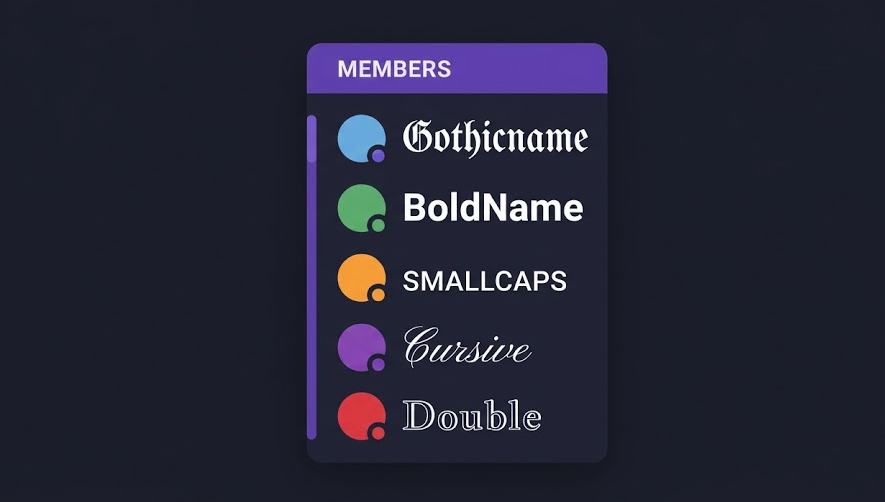
Fancy text is an easy way to make it memorable without doing anything elaborate. Here’s how it works and what looks good.
Discord usernames vs. server nicknames
First, a bit of context that matters here: Discord has two different names.
Your global username (the @handle you chose when you signed up) is restricted to lowercase letters, numbers, underscores, and periods. No fancy Unicode allowed there — Discord enforces this at the registration level.
Your display name and your server-specific nickname, however, are a different story. Both support Unicode characters fully. The display name is what most people actually see when you chat — and that’s where fancy text can make a real difference.
So if you want a fancy-looking name on Discord, the path is: set your display name (global, shown everywhere) or ask a server admin to set a custom nickname for you in a specific server.
What kind of fancy text works on Discord
Discord renders most Unicode character sets without issue. A few styles that consistently look good in Discord’s dark-mode interface:
- 𝔾𝕠𝕥𝕙𝕚𝕔 / 𝔻𝕠𝕦𝕓𝕝𝕖-𝕊𝕥𝕣𝕦𝕔𝕜 — Gamer classic. Stands out especially well on dark backgrounds.
- 𝔊𝔬𝔱𝔥𝔦𝔠 𝔉𝔯𝔞𝔨𝔱𝔲𝔯 — More ornate. Popular in roleplay, DnD, and fantasy servers.
- 𝗕𝗼𝗹𝗱 𝗦𝗮𝗻𝘀 — Clean and assertive. Works in any server type.
- ꜱᴍᴀʟʟ ᴄᴀᴘꜱ — Subtle but distinctive. Readable at small sizes in the member list.
- 𝒞𝓊𝓇𝓈𝒾𝓋𝑒 — Popular with creative and lifestyle servers.
- Wide — Eye-catching but use sparingly — takes up a lot of horizontal space in chat.
One thing to avoid: names that are entirely in a hard-to-read style. Zalgo text, for example, might look cool in a screenshot but is genuinely annoying to read in a fast-moving chat. People will just refer to you by a nickname they make up instead.
Name ideas by server type
Different servers have different vibes. Here are some directions you can take depending on where you’re hanging out:
Gaming servers (FPS, Battle Royale):
- 𝔾𝕙𝕠𝕤𝕥𝕊𝕙𝕠𝕥
- 𝗦𝗶𝗹𝗲𝗻𝘁𝗕𝗹𝗮𝗱𝗲
- ɴɪɢʜᴛʜᴀᴡᴋ
- 𝕭𝖑𝖎𝖙𝖟𝕶𝖗𝖎𝖊𝖌
Roleplay / Fantasy servers:
- 𝔏𝔬𝔯𝔡 𝔄𝔯𝔳𝔢𝔫
- 𝒮𝒽𝒶𝒹𝑜𝓌𝓌𝑒𝒶𝓋𝑒𝓇
- ᴇʟᴅᴀʀᴀ ᴏꜰ ᴛʜᴇ ᴠᴏɪᴅ
Creative / Art / Music servers:
- 𝘴𝘵𝘶𝘥𝘪𝘰 𝘮𝘢𝘺𝘢
- 𝓪𝓻𝓬 ✦ 𝓵𝓲𝓰𝓱𝓽
- ᴄʜʀᴏᴍᴇ ᴡᴀᴠᴇ
Study / Focus servers:
- 𝙺𝚒𝚛𝚊 | 𝙻𝚘 𝙵𝚒
- 𝗰𝗼𝗳𝗳𝗲𝗲 + 𝗰𝗼𝗱𝗲
- sᴛᴜᴅʏ ʙᴜᴅᴅʏ
To generate any of these styles with your own name, head to the Discord Fonts Generator — type your name and click whatever style you want to copy.
Using symbols alongside fancy text
One thing that looks great in Discord names is combining a Unicode font style with one or two symbols. Some combinations that work well:
✦ 𝗡𝗮𝗺𝗲 ✦— four-pointed star as a frame𝒩𝒶𝓂𝑒 ·˚— soft aesthetic with dot + circle⟨ ɴᴀᴍᴇ ⟩— angle brackets for a structured look𝔑𝔞𝔪𝔢 ☽— crescent moon adds a dark/fantasy feel
You can grab symbols from the Text Symbols page and mix them in manually.
Server channel names with fancy text
If you run a Discord server, fancy text works for channel names too. A few ways people use it:
- Category headers with small caps:
ɢᴇɴᴇʀᴀʟ,ᴀɴɴᴏᴜɴᴄᴇᴍᴇɴᴛꜱ - Decorative dividers using blank channels named with just symbols:
─── ✦ ─── - Bot channels in a monospace/typewriter style to signal they’re technical
Keep in mind that Discord channel names are lowercase only (Discord converts them automatically), so all-caps styles won’t work there. Small caps, symbols, and mixed Unicode styles do work fine.
How to change your Discord display name
- Generate your desired name using the Discord Fonts Generator.
- In Discord, click your profile picture in the bottom left.
- Select Edit Profile.
- In the Display Name field, paste your styled text.
- Hit Save. Your new name appears in all servers immediately.
For a server-specific nickname (if you’re an admin or have permission): right-click on yourself in the member list → Change Nickname → paste and save.
Frequently Asked Questions
Can I use fancy text in my Discord @username?
No. Discord’s @username (the unique handle used for finding and mentioning you) is restricted to lowercase letters, numbers, underscores, and periods. Fancy Unicode characters are only supported in your display name and server nicknames.
Will fancy text show up correctly for everyone?
On modern devices and the Discord desktop/web app, yes. The most common Unicode styles render correctly across Windows, Mac, iOS, and Android. Very obscure character sets might show as boxes on older systems, but standard fancy fonts (bold, italic, small caps, Fraktur) are widely supported.
Can server admins restrict fancy names?
Not directly — Discord doesn’t have a built-in “plain text only” nickname setting. Admins can manually rename members using server nicknames, though. Some community servers have rules against unreadable names in their server guidelines.
Does fancy text work in Discord bios and About Me?
Yes. Your Discord profile bio (the About Me section visible when someone clicks your profile) fully supports Unicode characters. Same copy-paste process applies.