
Your Instagram bio has exactly 150 characters to make someone decide whether to follow you or not. That’s not a lot of real estate. And when every other bio looks the same — basic Arial text, maybe a couple of default emojis — a little bit of visual difference goes a long way.
Fancy fonts are one of the easiest ways to make your bio look intentional. Not gimmicky, not over-designed — just different enough to catch the eye. Here’s how to actually do it well.
Wait — are these real fonts?
Not exactly. When you see someone’s Instagram bio written in 𝒸𝓊𝓇𝓈𝒾𝓋𝑒 or 𝗯𝗼𝗹𝗱 letters, those aren’t custom fonts loaded into the app. Instagram only renders one font — its own. What you’re seeing are actually different characters from the Unicode standard.
Unicode is the global system that assigns a unique code to every character in every language, symbol, and script on Earth. Buried inside it is a block called “Mathematical Alphanumeric Symbols” — originally meant for math papers — that just happens to contain bold, italic, script, and double-struck versions of every letter. Because they’re real characters, not styled text, they travel with you anywhere you paste them: Instagram, TikTok, Twitter, your phone’s notes app. No app needed.
A fancy font generator just converts your normal text into these Unicode characters so you can copy and paste them directly.
Which styles actually look good in an Instagram bio?
Not every style is bio-appropriate. Zalgo text (the glitchy horror-movie style) looks cool as a novelty but kills readability. Wide spaced text eats through your 150-character limit fast. Here’s what tends to work:
- 𝗕𝗼𝗹𝗱 — Clean and punchy. Great for a job title or single key phrase you want to stand out.
- 𝒞𝓊𝓇𝓈𝒾𝓋𝑒 / 𝒮𝒸𝓇𝒾𝓅𝓉 — Feels personal and creative. Popular for lifestyle, fashion, and wellness accounts.
- ɪᴛᴀʟɪᴄ ꜱᴍᴀʟʟ ᴄᴀᴘꜱ — Subtle and sophisticated. Works well for the descriptive lines in a bio.
- 𝐒𝐞𝐫𝐢𝐟 𝐁𝐨𝐥𝐝 — More editorial, almost magazine-like. Good for photographers or designers.
- Aesthetic / Wide — Best used sparingly, for one word or a short phrase, not a whole sentence.
The golden rule: use one style for contrast, not five styles for chaos. Pick one fancy font for your name or tagline, keep the rest of the bio in plain text, and let the contrast do the work.
How to do it: step by step
- Go to the Instagram Fonts Generator.
- Type your text — your name, tagline, or a phrase from your bio.
- Scroll through the styles that appear below. Click on any one to copy it automatically.
- Open Instagram → Edit Profile → Bio, and paste.
- Hit save. That’s it.
One thing to be aware of: Instagram sometimes adds a space after you paste rich text. Just tap to position your cursor and delete any unwanted gaps before saving.
Bio layout tips that most people skip
The font is just one piece. The other big thing that separates a polished bio from a messy one is layout. A few things that actually help:
Line breaks are your friend. Instagram lets you press Enter to create new lines in your bio. Instead of one long paragraph, break it into three short lines. It’s much easier to scan on a phone screen.
Use symbols as dividers. Something like · · · or ✦ or | between different pieces of information makes the bio feel structured without needing a lot of words. You can grab these from a symbols page or from our emoji keyboard.
Put your best line first. Most people skim bios from top to bottom and stop after the first line if it doesn’t grab them. Lead with whatever makes you interesting — your niche, your offer, or a one-line hook — before the contact info.
A few real examples
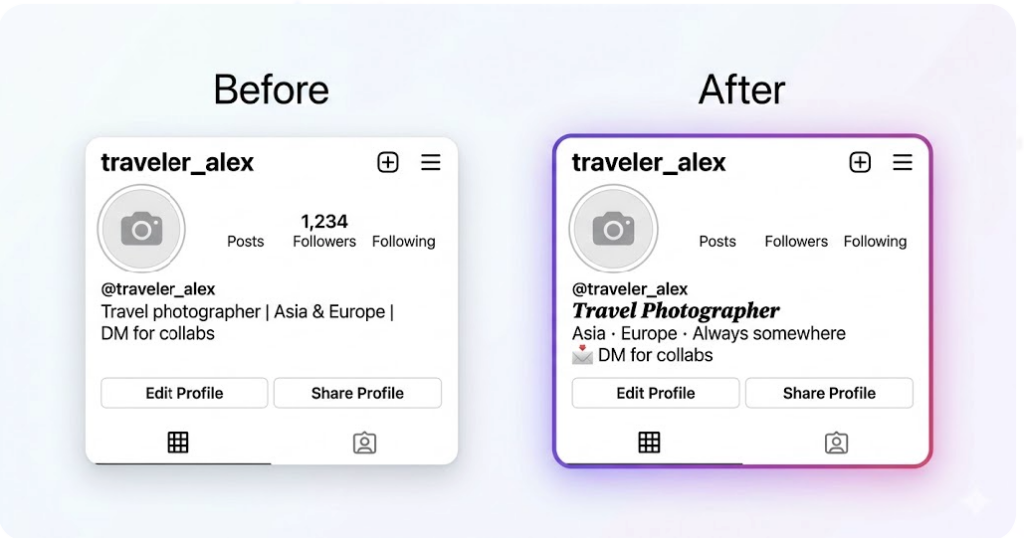
Here’s a before and after for the same bio content:
Before:
Travel photographer | Asia & Europe | DM for collabs
After:
𝙏𝙧𝙖𝙫𝙚𝙡 𝙋𝙝𝙤𝙩𝙤𝙜𝙧𝙖𝙥𝙝𝙚𝙧
Asia · Europe · Always somewhere
📩 DM for collabs
The content is identical. But the second version uses italic bold for the title, plain text for the descriptive line, and a single emoji to signal the action. It reads instantly.
Another example for a small business:
Before:
Handmade candles | Eco-friendly | Ships worldwide | Link in bio
After:
ʜᴀɴᴅᴍᴀᴅᴇ ᴄᴀɴᴅʟᴇꜱ 🕯️
Eco-friendly · Ships worldwide
↓ Shop now
Small caps for the brand name, plain text for the details, a downward arrow pointing to the link. Clean, intentional, easy to read.
What to avoid
A few pitfalls worth mentioning:
- Don’t mix too many styles. Bold name + cursive tagline is fine. Bold + cursive + bubble + gothic in the same bio looks like a ransom note.
- Watch your character count. Some Unicode characters count as more than one character in Instagram’s counter. If your bio gets cut off, simplify the fancy text sections.
- Avoid styles that render as boxes on older devices. Stick to the more common Unicode styles (bold, italic, script, small caps) and avoid very niche symbol sets that might not render on all phones.
Frequently Asked Questions
Will fancy fonts affect my Instagram SEO?
Instagram’s search algorithm reads your username and display name for discovery, but not your full bio text in the same way. The name field is where keywords matter most for search. Using fancy fonts in the descriptive part of your bio won’t hurt discovery, but keep your display name legible if you want to be found by name searches.
Why do some fancy fonts show as boxes on some phones?
Boxes appear when a device’s system font doesn’t have a glyph for that specific Unicode character. This is more common with very niche scripts or obscure symbol sets. The mainstream styles — bold, italic, script, small caps — are supported on virtually all modern Android and iOS devices.
Can I use fancy fonts in Instagram captions too?
Yes, exactly the same way. Generate the text, copy it, paste it into your caption. It works in comments too. Just keep in mind that fancy text in captions isn’t searchable by hashtag, so use plain text for hashtags.
Does this work on Instagram for business accounts?
Yes, business and creator accounts have the same bio editor. The character limits and font behavior are identical.